Supercharging your AI agent with MCP
How to add a second AI brain to the code assistant using Model Context Protocol.
- 10 min read

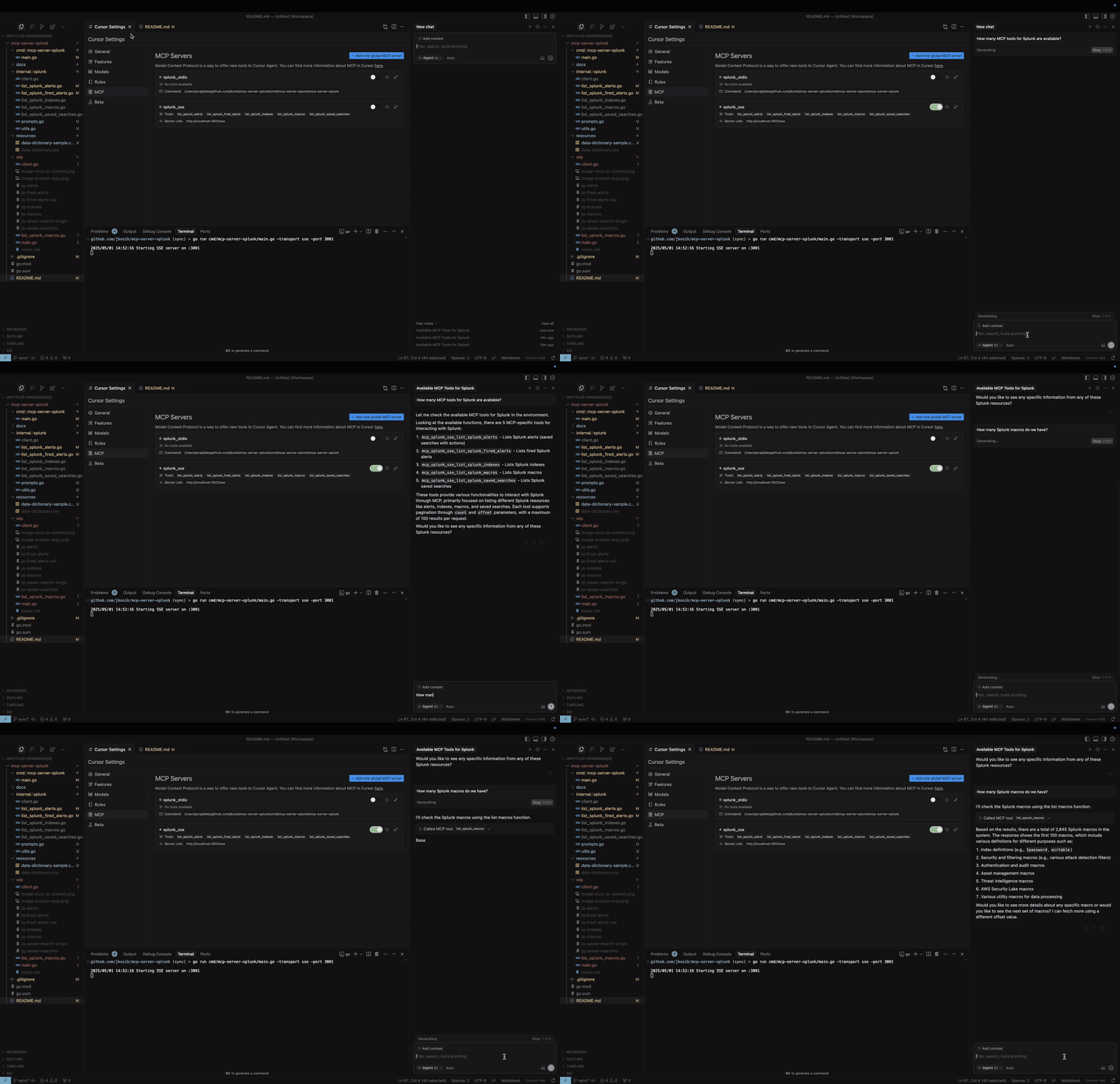
In this blog post, I’ll show you how I supercharged the Cursor code assistant by feeding it real-time data from remote data sources — essentially teaching it things it wasn’t pre-trained to know. Technology described offers huge range of other use cases and is a “new big thing in AI”.
AI-powered code assistants like GitHub Copilot and Cursor are rapidly transforming the way we write, debug, and manage code. They’re smart, fast, and often feel like having a coding companion in your IDE. But there’s a catch: most of these tools depend entirely on pre-trained models, which means they can be out of sync with your current project or the latest changes in your environment.
That’s where things get interesting. We’ll dive into Cursor — an AI-first IDE that’s at the forefront of this evolution — and explore how you can break past those limitations using something called the Model Context Protocol (MCP). Specifically, I’ll walk you through how I connected real-time data from Splunk to Cursor, making the assistant context-aware and smarter on the fly.
Our today’s goal:
Use cases
Picture a cybersecurity team crafting and codifying detection rules for new threats, analyzing attack patterns, and building smart alerting systems. Now imagine giving their AI assistant direct access to the organization’s live security telemetry via Splunk. Suddenly, the assistant can spot coverage gaps, review past incidents, detect overlapping controls, and even suggest better responses - all in real time.
And that’s just one use case. The possibilities explode when AI assistants are connected to remote data sources. Here are a few more:
- A developer wants to surface known exploits related to their app’s dependencies by tapping into threat intelligence feeds.
- A journalist enriches their AI writing assistant with live updates from the Twitter API to produce timely, informed articles.
- A medical AI agent pulls patient records from multiple hospital databases to help draft a more accurate diagnosis.
- An urban planning AI analyzes real-time traffic and public transit data to propose smarter city layouts.
This goes far beyond software development. We’re stepping into a world where AI agents, each with their own specialty, can collaborate, share knowledge, and work together in a domain-aware, bi-directional way. This is the promise of Agentic AI — a new frontier of autonomous, cooperative AI agents reshaping how we interact with technology.
Enhancing Code Assistants: The Current State
Code assistants already come with some powerful ways to customize and extend their behavior. Cursor, for example, supports a special file called .cursorrules, which lets you fine-tune how the AI responds to your queries. Think of it as giving the assistant a set of house rules — it reads them before answering you.
Here’s a practical example of a .cursorrules file placed at the root of your repository. Cursor evaluates it in real time whenever it responds to your prompts:
Use the standard library's net/http package for API development:
Implement proper error handling, including custom error types when beneficial.
Use appropriate status codes and format JSON responses correctly.
Implement input validation for API endpoints.
Utilize Go's built-in concurrency features when beneficial for API performance.
Follow RESTful API design principles and best practices.
Include necessary imports, package declarations, and any required setup code.
In addition to .cursorrules, Cursor also supports importing Project Rules in the .mdc format. These rules offer even more granular control over how the assistant behaves, and they can include file globs and custom directives to guide the AI more precisely within specific parts of your codebase.
Here’s an example of how a .mdc rule might look:
---
description: General rules for Go API development using the net/http package, focusing on code quality, security, and best practices.
globs: /**/*_api.go
---
- You are an expert AI programming assistant specializing in building APIs with Go, using the standard library's net/http package and the new ServeMux introduced in Go 1.22.
- Always use the latest stable version of Go (1.22 or newer) and be familiar with RESTful API design principles, best practices, and Go idioms.
- Follow the user's requirements carefully & to the letter.
- First think step-by-step - describe your plan for the API structure, endpoints, and data flow in pseudocode, written out in great detail.
- Confirm the plan, then write code!
Beyond Pre-trained Data: The Next Frontier
To truly unlock the potential of the code assistants (or any other AI agents), we need to go beyond static, pre-trained knowledge of the LLM. There are several approaches to achieve this:
- Retrieval-Augmented Generation (RAG): Allows the AI to access and incorporate external information from your codebase, documentation, and other sources.
- Model Fine-tuning: Customizes the model’s behavior for your specific use cases and domain.
- Custom LLM Selection: Gives you the flexibility to choose the most appropriate language model for your needs.
While approaches like RAG have proven valuable, they often require complex infrastructure setup, lack standardization across tools, and create tight coupling between your applications and data sources. RAG implementations typically need custom vector databases, embedding pipelines, and retrieval logic - adding significant development overhead.
Can we do better? Yes.
The Model Context Protocol (MCP) addresses these limitations by providing a standardized way to connect AI models with external data sources in real-time, requiring minimal setup while maintaining loose coupling between components. MCP does not substitute RAG, rather it provides general-purpose standardization and integration framework.
Introducing the Model Context Protocol
The Model Context Protocol (MCP) is an innovative open protocol that standardizes how applications provide context to Large Language Models (LLMs). Think of MCP as universal connector between AI agents. This concept is critical for the future agentic AI world where all agents speak the same language. Without MCP, developers would need to build custom one-off integrations with the outer world with constant maintenance. With MCP, every system (in our case Splunk) will have MCP interface offered to the AI agents for integration.
MCP protocol was spearheaded by the artificial intelligence company Anthropic and quickly adopted by AI leaders like OpenAI or Google. The MCP ecosystem is rapidly growing, with multiple reference implementations available on GitHub. These include integrations for popular services and tools like GitHub, Jira, Kubernetes, documentation systems and many more.
Protocol specification and further details can be found available at modelcontextprotocol.io.
What makes MCP particularly powerful is its architecture, which follows clear separation of concerns:
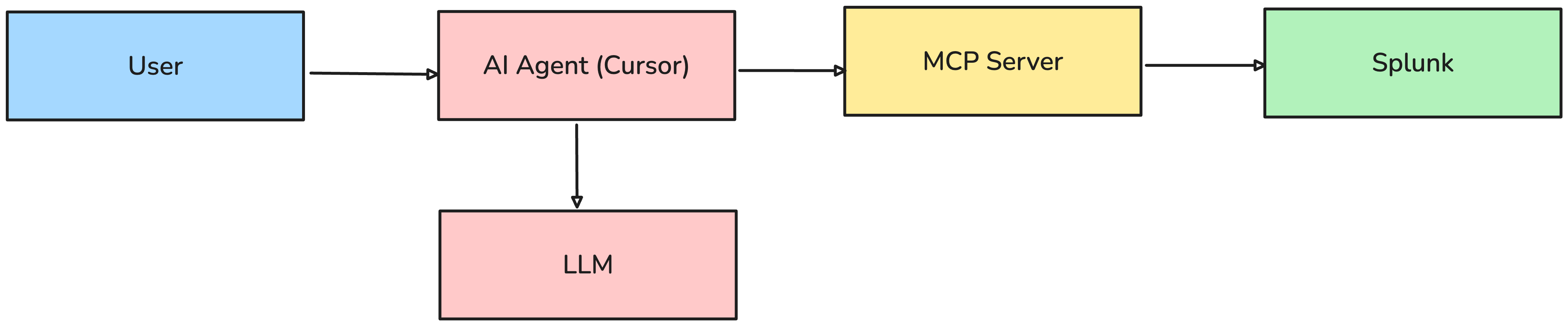
- AI Agent (Client) - e.g. Cursor that provide the AI interface for the user and utilises its own access the LLM.
- MCP Server implements the protocol, exposes backend functionalities and processes requests from the Cursor.
- Backend Service - e.g. Splunk, that provides the actual data and capabilities.
At the heart of MCP lies five key concepts that work together to make AI assistants more powerful and practical:
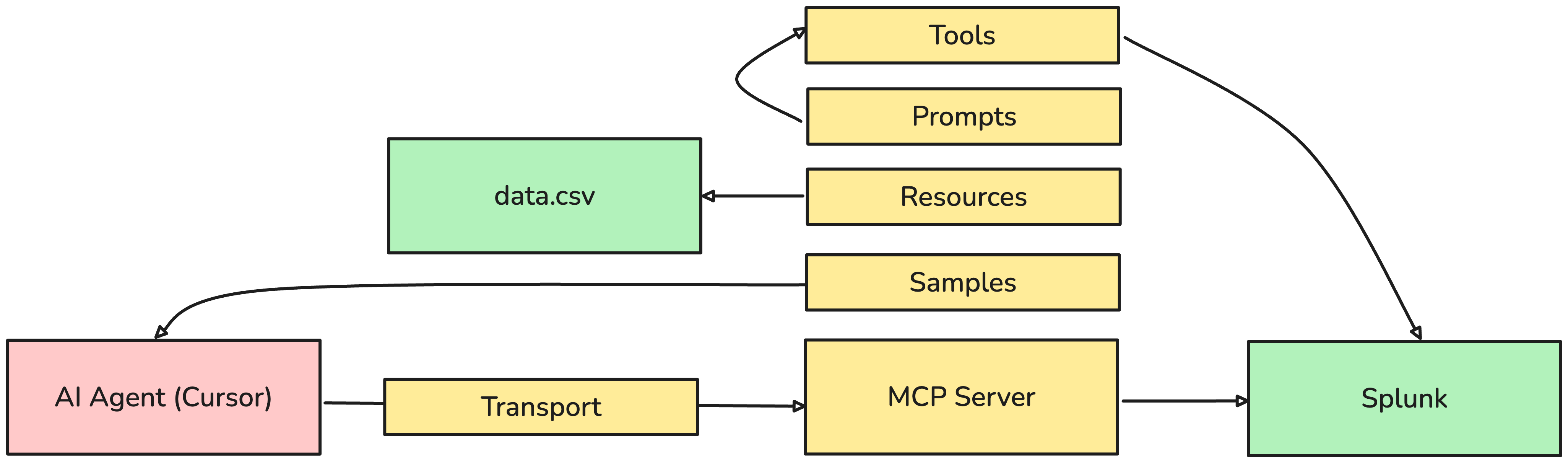
Tools: Your AI’s Hands Tools are functions of varous compexity that let AI perform real actions in your systems. Just like clicking a button or running a command, Tools allow AI to do things like search logs, check alerts, or query databases. You can parametrise the actions on the fly in human langage. The client application backed by LLM will translate your words directly to API call parameters.
Resources: Your AI’s Memory MCP server can expose static documents, e.g. CSV file which is parsed by the client and added into the LLM context window.
Prompts: Your AI’s Instructions Prompts are reusable templates that tell the AI how to think about specific tasks. E.g. to use more MCP Tools in a sequence to find a corellation between Splunk indexes and Splunk alerts.
Sampling: Your AI’s Questions Sampling allows the Model Context Protocol (MCP) to request additional information from the client when needed — much like a teammate asking follow-up questions to better understand a task.
Transport: Your AI’s Communication Channel Transport is simply how all these pieces talk to each other securely and efficiently. Using standard protocols (like STDIO and SSE), it ensures smooth communication between your AI agent and your backend systems.
- STDIO (Standard Input/Output) runs a binary and listens on the standard input and responds to the standard output. STDIO MCP server runs mostly locally on the laptop next to the Cursor. However, there are also services where STDIO MCP server is containerised and hosted cetrally.
- SSE (Server-Sent Events) runs a permanent HTTP server with bi-directional streaming capabilities. In Cursor case, SSE MCP server can run literally anywhere and can centrally manage all credentials needed for talking to backend services (e.g. Splunk API in our case).
Implementation
I have used golang SDK: github.com/mark3labs/mcp-go which offers very comfortable way of register new MCP Tools (and Prompts/Resources/etc.) so that we can focus mainly on the functionality of the Tool itself.
MCP Tool list_splunk_fired_alerts registration includes definition of the function parameters and looks as follows:
	alertsTool := mcp.NewTool("list_splunk_fired_alerts",
		mcp.WithDescription("List Splunk fired alerts (paginated by count and offset arguments)"),
		mcp.WithNumber("count", mcp.Description("Number of results to return (default 100)")),
		mcp.WithNumber("offset", mcp.Description("Offset for pagination (default 0)")),
		mcp.WithString("ss_name", mcp.Description("Search name pattern to filter alerts (default \"*\")")),
		mcp.WithString("earliest", mcp.Description("Time range to look back (default \"-24h\")")),
	)
In this case we want the MCP Tool to list all fired Splunk alerts within the specified timeframe, filtered by the alert name. equivalent of this curl call:
curl -s -X POST "https://SPLUNK-URL:8089/services/search/jobs/export" \
  -d search='search index=_audit action=alert_fired ss_name="*Alert_CRITICAL*" earliest=-24h | table _time, ss_name' \
  -d output_mode=json \
  -H "Authorization: Bearer $SPLUNK_TOKEN" \
  -H "Content-Type: application/json"
The Tool function will execute a similar query, however in golang and with parametrised ss_name(Splunk alert name) and earliest fields while implementing pagination as well.
Under the hood the following steps are executed:
- The client (Cursor) processes the user prompt and checks the available MCP Tools automatically. If the appropriate MCP Tool is found, it is offered for execution.
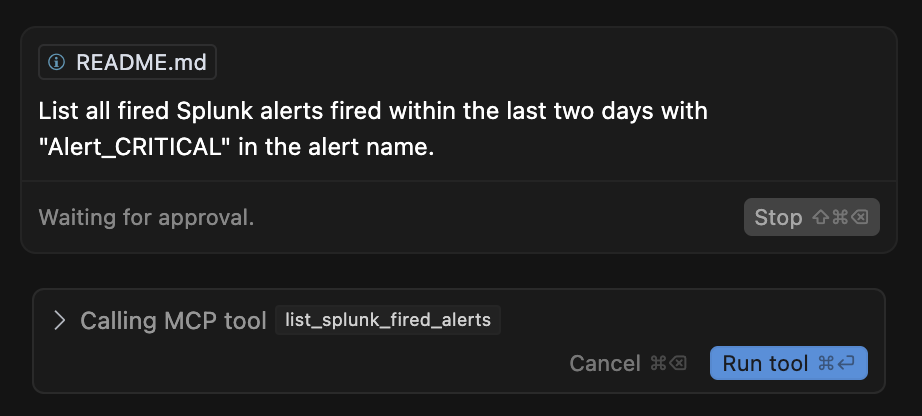
- Cursor uses its LLM to transform user’s prompt into the parameters expected by the Tool function. You can see that the Cursor overwrote the default payload from
-24hto-48hby understanding human language...within the last two days...in the prompt.
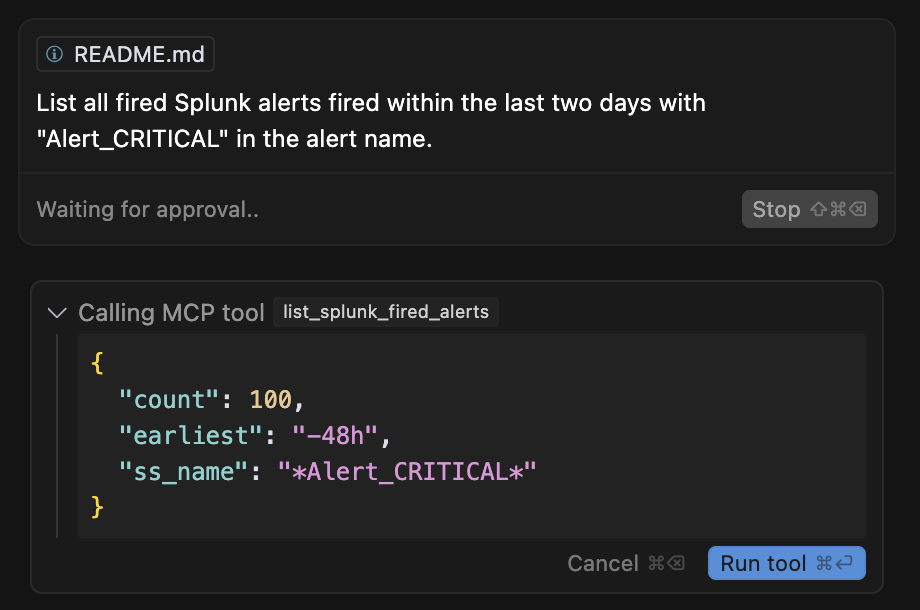
- User confirms execution of the MCP Tool in Cursor UI and the payload is delivered to the MCP Server.
- MCP Server runs Splunk API call.
- Splunk provides JSON respons back to MCP Server.
- MCP server forwards Splunk response back to the Cursor where Cursor’s LLM already understands JSON format without any extra effort.
- MCP Response is added into the Cursor’s context and remembered and can be used later on in the Cursor chat.
JSON-RPC
The underlying call between the AI agent (Cursor) and MCP server uses JSON-RPC and the real payload looks as follows:
{
  "jsonrpc": "2.0",
  "id": 1,
  "method": "tools/call",
  "params": {
    "name": "list_splunk_fired_alerts",
    "arguments": {
      "count": 100,
      "earliest": "-24h",
      "ss_name": "*Alert_CRITICAL*"
    }
  }
}
Cursor configuration
MCP server is configured via Cursor’s UI Settings which modifies local file ~/.cursor/mcp.json

mcp.json for STDIO transport mode
Secrets have to be managed locally.
{
  "mcpServers": {
    "splunk_stdio": {
      "name": "Splunk MCP Server (STDIO)",
      "description": "MCP server for Splunk integration",
      "type": "stdio",
      "command": "/Users/juraj/data/github.com/jkosik/mcp-server-splunk/cmd/mcp-server-splunk/mcp-server-splunk",
      "env": {
        "SPLUNK_URL": "https://your-splunk-instance:8089",
        "SPLUNK_TOKEN": "your-splunk-token"
      }
    }
  }
}
mcp.json SSE transport mode
Handles session management and allows centralised management of secrets used by the MCP Tools.
{
  "mcpServers": {
    "splunk_sse": {
      "name": "Splunk MCP Server (SSE)",
      "description": "MCP server for Splunk integration (SSE mode)",
      "type": "sse",
      "url": "http://MCP-SERVER:3001/sse"
    }
  }
}
Conclusion
The Model Context Protocol represents a significant step forward in AI agentic world and boost development of MCP interfaces for hundreds of services. By providing a standardized way to connect AI models with real-world data and tools, MCP enables more powerful, context-aware, and practical AI assistants and highly-needed standardisation.
The full codebase used in this blog post—along with a detailed README.md explaining the technical setup—is available on GitHub: https://github.com/jkosik/mcp-server-splunk.
Make the IDE a single tool for all tasks
The MCP protocol not only standardizes data access and extends LLM context. It also enables task execution across remote systems.
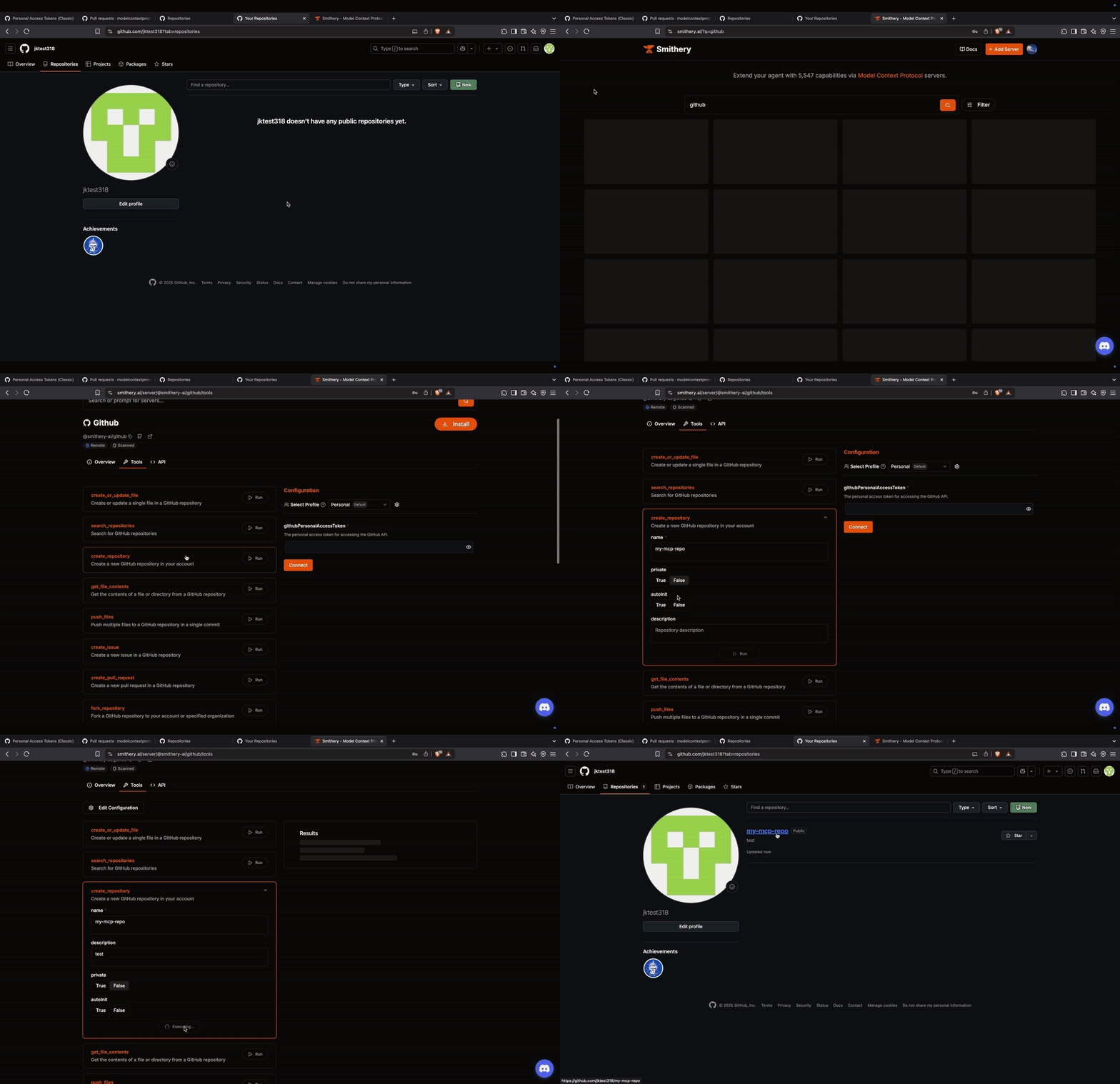
The video below demonstrates one of the public MCP databases: smithery.ai, which streamlines the registration and deployment of MCP servers to your preferred IDEs and even allows direct execution of MCP Tools via its UI.
Everything shown in the video can also be performed through Cursor or Copilot. For example, simply ask your code assistant:
Create a GitHub repository "My repo", clone it, and build a skeleton structure for my new Golang Hello World app.
Happy coding!
- Tags:
- AI