Subdomain Takeover
Stealing domain of a world-known company may be easy when company lacks scrutiny around their DNS records.
- 8 min read
Have you been thinking about taking over somebody else’s domain or subdomain and manage it as your own one? Let me demonstrate today, that it may not be that hard.
There is a well known company, let’s call it Bluepill owning bluepill.com domain. For sure strongly protected by highly skilled DNS admins, firewalls, log management systems. The easiest way how to “steal” a domain is to wait until the domain expires and purchase it sooner than the original owner. Of course, this is a lame approach and rarely works.
What if we take completely different approach and rather take control over the resources pointed to by the legitimate DNS records (e.g. CNAMEs)? From the victim’s perspective there is no difference. We will simply “re-use” exiting DNS setup and take over downstream elements.
Enter the world of subdomain takeover.
Bit of Theory
The most frequent DNS records point to an IP address (A-type record) or further downstream FQDN (CNAME-type record). In pre-cloud era it was expected that primary DNS record, CNAME records and target IP addresses are owned by the same entity. However it is not the case in the cloud world where resources emerge and disappear and oftentimes are even ephemeral and owned by various companies.
Imagine the following DNS entry:
www.example.com A 1.2.3.4
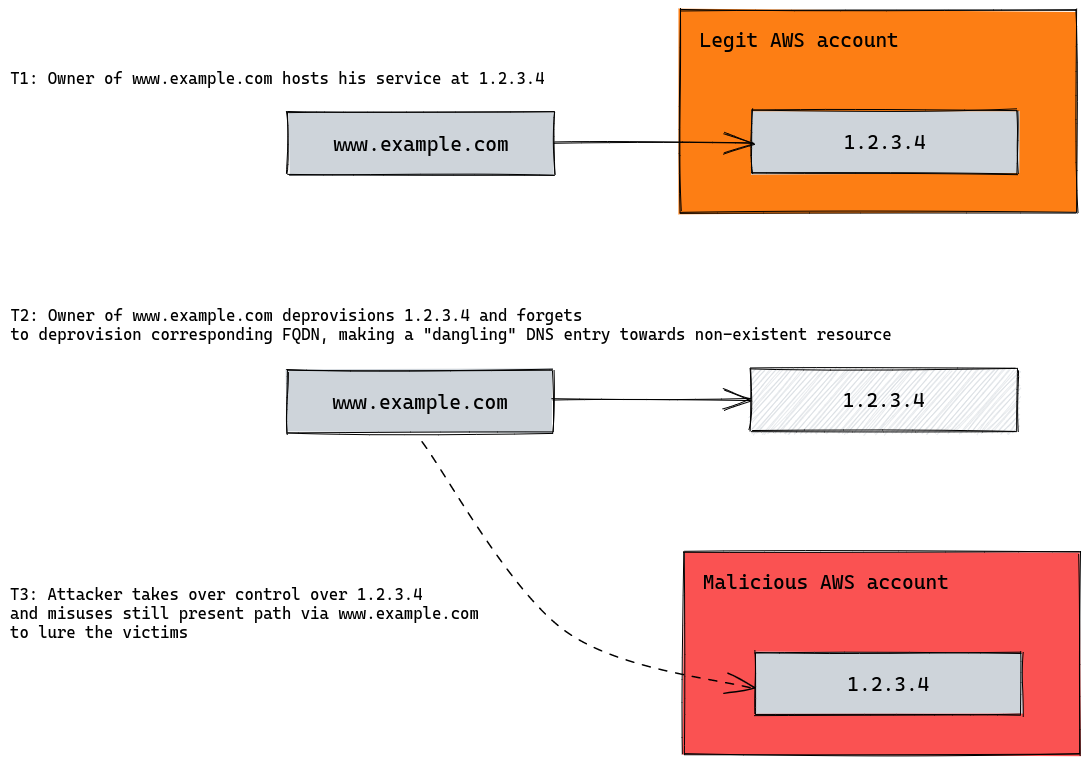
The domain www.example.com points to an IP address of an EC2 instance in AWS cloud. In case we deprovision our server, IP address can be released for completely different customer. New owner of the IP address can create own DNS records (e.g. www.newcustomer.com) pointing again to 1.2.3.4. The problem emerges, when the owner of www.example.com does not deprovision his original DNS record and still keeps parallel path to the somebody else’s server. This is also called “dangling” DNS record. In case 1.2.3.4 is adopted by a malicious actor, bad things can happen.
The following image depicts the situation:
In the real world, attack vectors mostly do not include IP address takeover since it may be not that easy to acquire the right IP address on-demand. Attacker would rather look for public cloud services which can easily be acquired. I.e. non-existent cloud resources to which dangling DNS records still point to.
Attacker can also pre-register cloud resources which do not have any corresponding DNS record yet in place, however it is expected that such DNS record will be created soon by the victim.
E.g. www.victim.com CNAME mycompany.com.s3-website-eu-west-1.amazonaws.com. Once the victim creates DNS record and does not configure the application yet, attacker is already controlling the subdomain.
Let’s discuss dangling DNS entry for AWS S3 buckets to narrow down the explanantion of the problem. Attack path would be as follows:
- Victim created S3 bucket hosting static web site and pointed his corporate FQDN to it.
- Victim deprovisioned S3 bucket and forgot to remove DNS entry, making a dangling DNS record.
- Attacker identifies dangling DNS record and re-creates S3 bucket to let requests pass through the original FQDN to “his” S3 bucket.
- Attacker mimics legitimate victim’s portal in his S3 bucket using static website or redirects users where needed and steals credentials afterwards.
Attacking bluepill.com
Enumerate DNS
First we need to enumerate victim’s DNS zone. We can execute DNS bruteforce attack or simply utilize services which are enumerating public subdomains already, e.g. Virustotal, AbuseIPDB, TLS certificate transparency logs or many others.
As a result we got 3005 DNS records within bluepill.com.
Identify active DNS records
Once we have a raw list of subdomains it is needed to test which domains are active and afterwards analyze responses.
We would look for those subdomains, which CNAME to AWS S3 domains like BUCKETNAME.s3.amazonaws.com or BUCKETNAME.s3-website-REGION.amazonaws.com (used for static website hosted in the S3 bucket).
These responses deserve further investigation:
mpp.bluepill.com.		       3600	IN	CNAME	mpp.bluepill.com.s3-website-eu-west-1.amazonaws.com.
ediint3.bluepill.com.   	    300	IN	CNAME	blank-page.com.s3-website-eu-west-1.amazonaws.com.
ediint4.bluepill.com.         300	IN	CNAME	blank-page.com.s3-website-eu-west-1.amazonaws.com.
devfederatenew.bluepill.com.  300 IN	CNAME	blank-page.com.s3-website-eu-west-1.amazonaws.com.
ofb.bluepill.com.	    	    300	IN	CNAME	blank-page.com.s3-website-eu-west-1.amazonaws.com.
primeppd.bluepill.com.     	300	IN	CNAME	blank-page.com.s3-website-eu-west-1.amazonaws.com.
Analyze DNS responses
mpp.bluepill.compoints tompp.bluepill.com.s3-website-eu-west-1.amazonaws.com.which is a static AWS website hosted inmpp.bluepill.com.s3.amazonaws.comS3 bucket (Bucket name: mpp.bluepill.com).
Opening the URL in the browser results in confirmation, that the S3 bucket already exists and is (presumably) under Bluepill’s control. Unfortunately the bucket does not allow public access so we move on:

Further subdomains have something in common. They all point to the blank-page.com S3 bucket.
ediint3.bluepill.comredirects tohttps://catalog.industrialautomationco.com/. Not sure howindustrialautomationco.comis connected withbluepill.comthough. Note (remember for later): S3 bucket static website allows to host the website directly in the local S3 bucket, in external S3 bucket or can redirect to external URLs which was also this case.ediint4.bluepill.comandofb.bluepill.commanifested miscofigured static websites.
And now comes the most interesting part:
devfederatenew.bluepill.com. 300 IN CNAME blank-page.com.s3-website-eu-west-1.amazonaws.com.
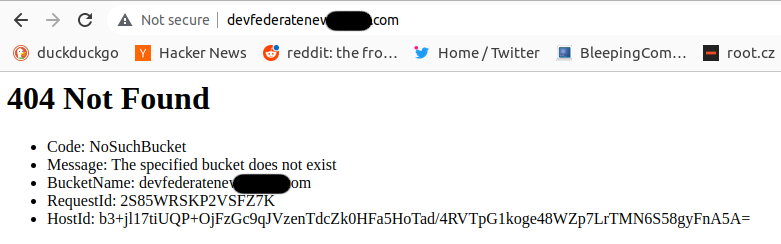
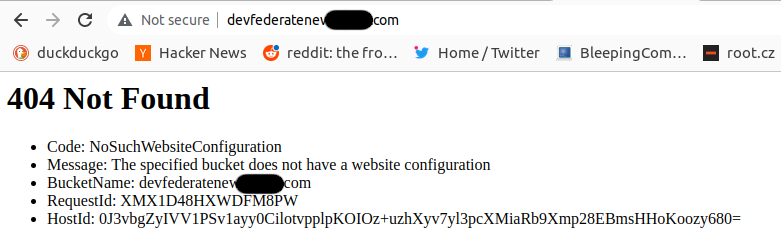
devfederatenew.bluepill.com provides different error.
Seems as if devfederatenew.bluepill.com subdomain points to blank-page.com S3 bucket and applies static website redirection rules to redirect traffic to external S3 bucket. And this time to the non-existent S3 bucket devfederatenew.bluepill.com as indicated directly by the BucketName field in the error message:
Let’s try to register this bucket and see if packets will reach it. The action is successful, however we are still getting an error:
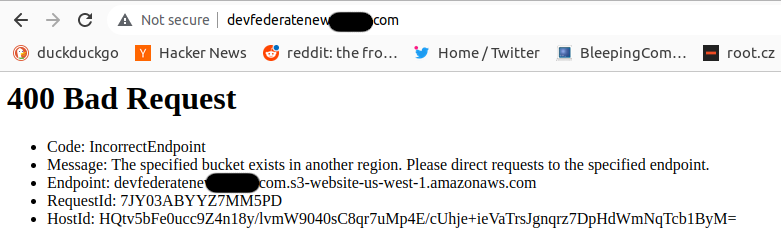
We have created S3 bucket in the wrong AWS Region - the default one us-west-1. S3 buckets are global resources and there is no Region reference in the bucket URL. However static website redirect expected bucket in the same Region. AWS error response was very descriptive and helpful again.
We have to migrate our bucket to eu-west-1 Region which was easily asssumed from the original DNS responses analysed in the very beginning. AWS does not allow direct migration of S3 bucket between Regions. We have to destroy and recreate the bucket. The only issues is that AWS reserves ~1 hour window before allowing to re-create S3 with the same name. Simple script helped to retry bucket creation in eu-west-1 so that nobody was faster then us.
Now the bucket is created in the correct Region and we are getting promising 404 error indicating that we have just minor bucket configuration problem to resolve:
After a while the static website is configured in the S3 bucket devfederatenew.bluepill.com which is under our control and we can upload any pages, including redirection rules, client-side Javascript and so on:
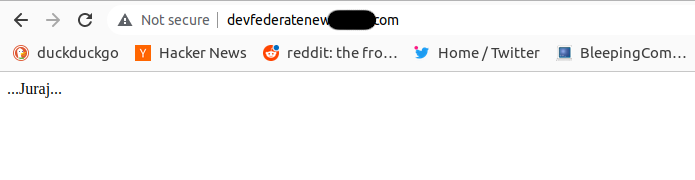
We have successfully taken over Bluepill subdomain!.
Now bad actor could mimic Bluepill design and launch various kinds of further attacks.
Responsible disclosure
At this point the vulnerability was shared with the vendor via “responsible disclosure” and shared with https://hackerone.com which has provided additional communication channels towards Bluepill. The vulnerability was assessed as HIGH with score of 7.5 out of 10. The problem was fixed in ~1 week.
In the meantime I have recalled not inspecting the last subdomain pointing to the same S3 bucket via primeppd.bluepill.com URL. To my surprise my browser displayed something that does not look Bluepill-related:
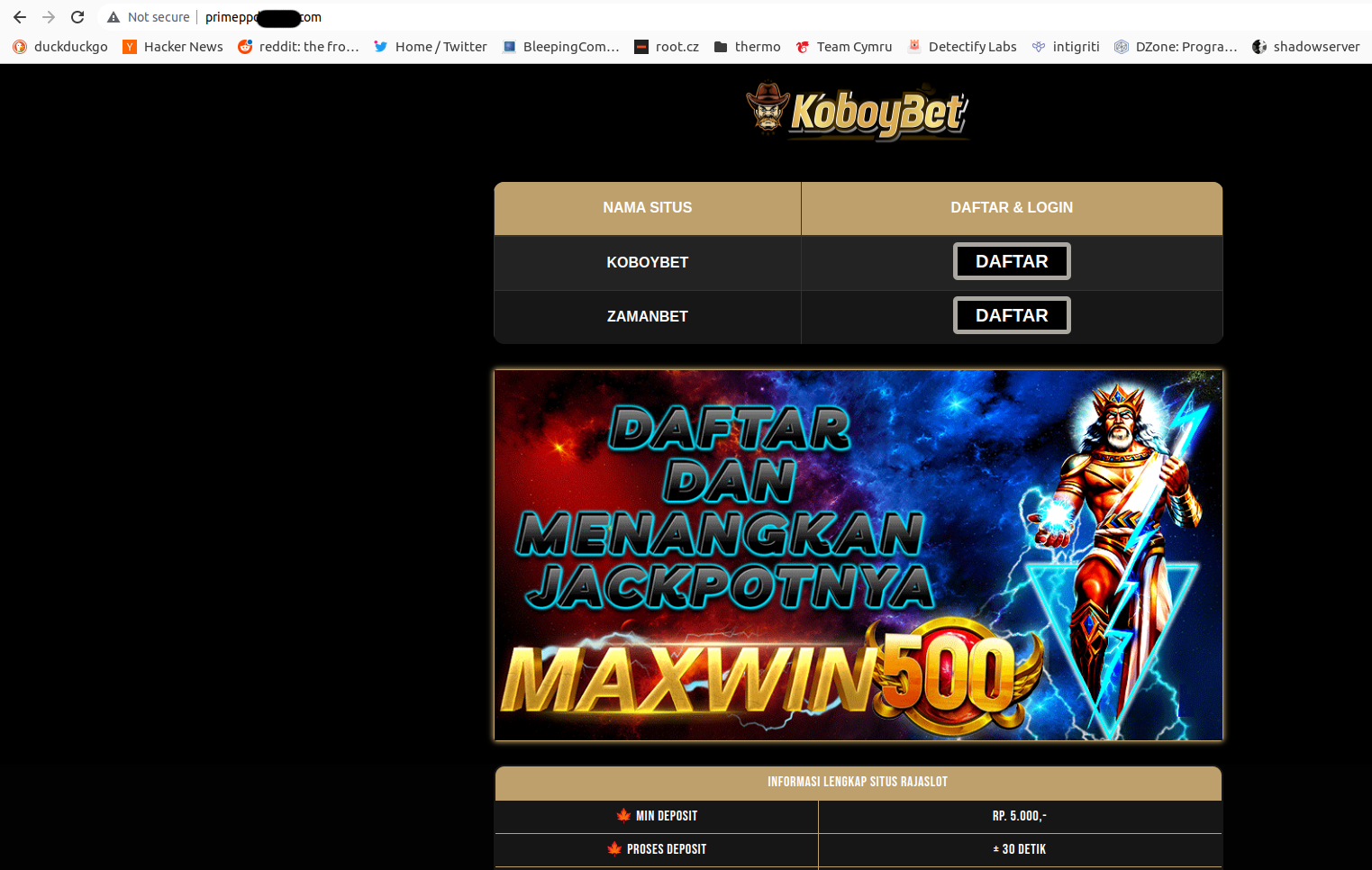
Seems as somebody already took over another Bluepill subdomain and misused it for own benefits.
Apparently the original fix was only about deleting devfederatenew.bluepill.com CNAME record so that it does not reach S3. However, the underlying S3 bucket blank-page.com was not auditted for further misconfigurations. Bluepill was instructed to review the underlying bucket configuration and DNS entries deeply, including all redirection rules.
Public cloud attack surface
Public clouds significantly expand the scale of subdomains we can take over. See e.g. the list of Azure cloud domain. More of them have a potential to be taken over when dangling DNS records are in place. And now multiply the amount of domains by the amount of public cloud providers and companies using their services. Dangling DNS records have no expiration per se and improper administration of DNS records offers a lot of space and time to find weak points.
Beyond S3 and CNAMEs
Subdomain takeover is not related only to A or CNAME records. In case subdomains are delegated to external name servers, you can hijack dangling NS record and take over full sudomain and even create further DNS entries.
Multiple cloud services allow us to create resources with full control over their resource’s final FQDN. There is no reference to the victim’s cloud account or randomized number which would prevent us to re-create deprovisioned resource easily. Besides AWS S3 bucket we can encounter this behaviour in GCP Cloud Storage, Azure Cloud Services (classic), Azure Websites and elsewhere.
Besides S3 buckets and well-know cloud services, attention must be paid also to dangling pointers to:
- Wordpress.com pages
- GitHub or GitLab pages
- Git repositories
- Ngrok tunnels
- OCI Image registries
- etc.
Countermeasures
- Audit public cloud DNS services for dangling DNS records. Multiple GitHub projects are active in this regard.
- Implement “Infratructure as Code” so that DNS record management and cloud resource provisioning and deprovisioning are handled as one atomic unit.
- Do not use domain-named S3 buckets, e.g.
mycompany.com. Mind thats3.amazonaws.comands3-website-REGION.amazonaws.comsubdomains can be enumerated directly and can provide list of easy targets. Mind also, that habit of S3 buckets with embedded company name provide space for bucket pre-creation attacks similar to those which have been misused during package hijacking in NPM or PyPI repositories. - Cloud providers should avoid services where the user has full control over the resource FQDN. Embedding e.g. cloud account ID or random number to the resource FQDN provides significant obstacle for the attacker to take over somebody else’s resource.
- Cloud providers should provide controls who can create domain-named cloud resources. GCP uses some countermeasures for Google Cloud Storage to control who can create domain-named buckets.