On-prem AI
Building offline private LLM alternative to ChatGPT.
- 10 min read

This blog post provides a high-level overview of building a self-hosted AI system on-premises from scratch. Given the complexity of the topic, I’ll highlight key points that should prompt further self-study. My goal is to give you a basic understanding of the components involved, how they interact, and the steps needed to set up AI infrastructure locally.
I was recently tasked with creating a self-hosted AI system with strict security controls, no internet access, and capabilities similar to ChatGPT. In this post, I’ll share my approach, the challenges I faced, and the success I achieved.
We began with a clean slate and a few key requirements:
- A user experience similar to ChatGPT
- API-based access for future integration with AI applications
- Strict security measures throughout
Vocabulary
Here are some AI terms I’ll use frequently:
- Large Language Model (LLM): This is a type of AI model designed to understand, generate, and manipulate natural language text. Built using deep learning techniques, LLMs use neural networks with billions or even trillions of parameters and are trained on extensive text data.
- Generative AI: This refers to a model’s ability to create new data or content that resembles the data it was trained on.
- Inference: This is the process of making predictions or decisions based on a model’s training data.
First Experiments
Our first step was to identify the components needed for our stack. We determined that we required three key components:
- Large Language Model (LLM): This is the core of our system, providing the data generated from the learning process that the inference engine uses to produce responses.
- Serving Engine: This component handles the deployment and execution of the LLM.
- User Frontend: This is the interface through which users interact with the AI system. At the time, our main information source was Hugging Face, a valuable resource where the AI/ML community shares information and LLM models. Although Hugging Face offers LLMs as a service, our strict security requirements ruled out this option.
LLM Model
To start, we opted for a small 8GB model, the google/flan-t5-base, which can run on a CPU without issues. While it may not deliver extraordinary results, it is suitable for basic inference tasks. Each LLM has its strengths and weaknesses, influenced by factors like model size, purpose, and features. Some models are general-purpose, while others are tailored for specific tasks or support special features like function calling. Additionally, some models are multilingual or vary in the number of parameters.
As the model size increases, so do the hardware requirements for hosting it. After testing several Mistral and Mixtral LLMs, we decided that Meta’s Llama3 was the best fit for our chat and programmatic use cases.
An LLM is represented by a collection of files. This set typically includes a README file, a configuration file with metadata, a tokenizer file that governs conversion of the raw text into tokens, and the largest component, the model’s weights.
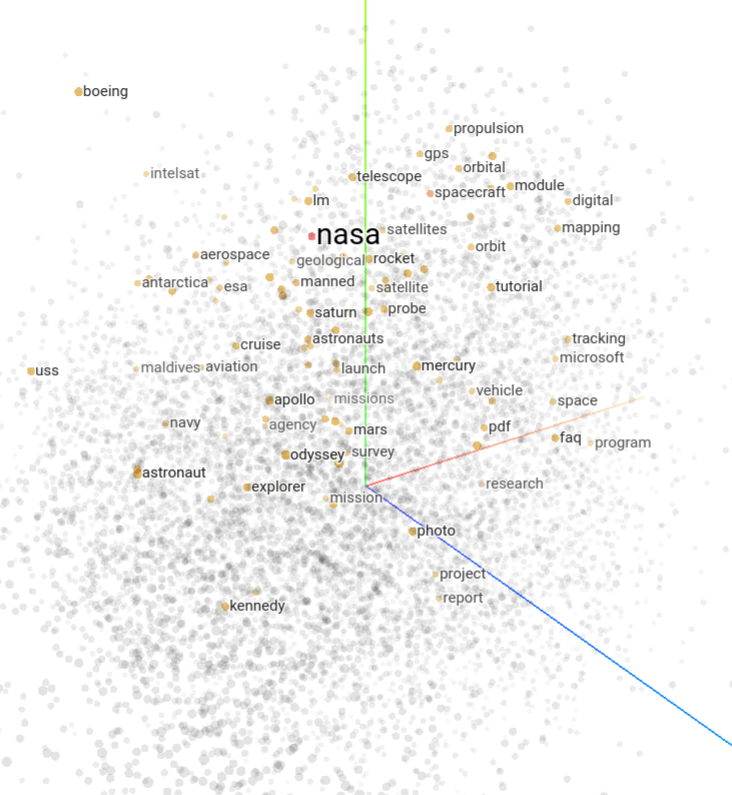
A token is a piece of a word that helps the LLM organize data efficiently. Tokens are stored in a multidimensional space known as the embedding space, which can have hundreds or even thousands of dimensions. Tokens are grouped based on similarity, which can be measured. The Tensorflow Projector provides a useful visualization of this concept.
Weights are the largest component of an LLM and play a crucial role in transforming data as it passes through the network. They determine how inputs are converted into outputs. Along with biases, weights are referred to as the “parameters” of the LLM. Generally, more parameters mean a smarter model. Weights can be stored in various file formats, and Meta’s Llama3 uses the .safetensors format, which is optimized for security by excluding executable code and also aims to enhance performance.
The complexity of LLMs is vast, and this is just a basic overview. For a deeper dive, check out this LLM visualization.
Once you choose an LLM, you need to decide where to host it. Options include using Hugging Face as an LLM SaaS provider, leveraging cloud services like AWS SageMaker, or self-hosting. We opted for self-hosting on our Kubernetes cluster. This required downloading the LLM model from Hugging Face using an ephemeral Kubernetes Pod and storing it in a persistent volume. If you go this route, choose the best storage class available. Although the costs are minimal compared to the GPU nodes needed later, the performance benefits are significant. Faster storage speeds are crucial for efficiently loading and warming up the model every time you restart your AI platform, saving valuable time.
LLM-Serving Engine
An LLM is essentially a collection of files that need to be hosted and made accessible for processing. Serving frameworks are used for this purpose. At the time of our analysis, the most popular options were TGI (Text Generation Inference) and vLLM. After comparing features, we chose TGI. Keep in mind that new frameworks and features are continually being developed, so our choice might not suit everyone’s needs.
We initially deployed TGI on a CPU node to get familiar with the basics. As we progressed and tested more LLMs, we had to upgrade our hardware, moving from dedicated CPU nodes to G4 and G5 EC2 instances, and finally to the high-end p4d.24xlarge EC2 instance with Nvidia A100 GPUs. The setup didn’t work perfectly at first, but fortunately, the Nvidia GPU operator for Kubernetes can be installed using Helm charts, and sample CUDA Pod templates are available to test GPU functionality.
TGI is well-documented, and configuring it involves several key changes. We instructed TGI to use our self-hosted LLM rather than connecting to Hugging Face over the internet and adjusted token limits. The default token limits in TGI are not suitable for corporate use. The most crucial parameters to adjust are MAX_INPUT_LENGTH and MAX_TOTAL_TOKENS. These settings control how many tokens TGI allows for user input (the “prompt”) and how many additional tokens it can generate, helping to manage video memory effectively.
TGI configuration can be further customized to manage individual GPU cores or apply live LLM quantization (which reduces weight size to save memory, albeit at the cost of response quality).
TGI provides several API endpoints. The basic /generate endpoint offers raw generative AI functionality, generating the next tokens based on the input. We selected the more complex /v1/chat/completions endpoint, which maintains conversation context on the client side. This endpoint keeps track of previous prompts and responses, maintaining the state and history of the conversation to help the LLM understand the context for each new input.
We later used the /v1/chat/completions API endpoint for programmatic access, which will be discussed further in the “AI Applications” section. This endpoint is also used by the UI frontend.
User Frontend
The user frontend is essential for daily and non-programmatic use cases. Early on, we realized that a UI with a locally hosted LLM would enable new use cases not feasible with public ChatGPT, such as handling sensitive data or source code.
We explored several open-source options and chose Chat-UI for its attractive and stable design. Chat-UI supports multiple LLM backends simultaneously, which was beneficial during our testing of various models.
We successfully integrated Chat-UI with OKTA and made minor customizations to enhance the user experience.
Chat-UI uses MongoDB to store individual chats and contexts, allowing users to revisit and continue previous conversations with the LLM. MongoDB cleanup provides a quick and safe method for deleting past conversations, which is useful for data retention. Alternatively, you can use the paid MongoDB Atlas service for advanced data retention policies.
No user data is stored on the TGI side. Instead, the client (Chat-UI or API client) manages the conversation history and provides it to the LLM (via the TGI API) as needed as part of the context window.
AI Applications
With TGI API and Chat-UI in place, we turned our attention to developing an AI application. One of the most interesting applications was a security review tool for pull requests in our version control system, Git.
Our stack included Golang for the backend and frontend, containerized and managed with Helm charts, and deployed using ArgoCD — a standard DevOps approach. Since TGI API exchanges JSON data, the internal logic was relatively straightforward. However, prompt engineering was a significant challenge. Despite having a powerful LLM, we needed to learn how to interact with it effectively. Initially, we assumed the LLM could understand and analyze pull requests and Git diffs, but it soon became clear that this was not the case.
Fortunately, large language models like those from OpenAI use a role-based model for organizing messages between the client and the LLM:
- System messages: Messages from the client that set the tone and configure the LLM’s persona. For example,
[System]: You are a skilled pull request analyst with a deep understanding of source code changes. - User messages: The actual prompt submitted by the user, which you would normally enter in ChatGPT.
- Assistant messages: Responses from the LLM.
It’s important to note that the LLM doesn’t only process the latest prompt; it receives the entire context window, which includes the history of previous interactions, up to the configured size of te context window. Since TGI and its LLM are stateless, maintaining this context is crucial for accurate responses.
When you click “New chat” in ChatGPT, the context window is cleared, and you start with a fresh context. However, OpenAI/ChatGPT likely tracks user identity in other ways.
Prompt engineering
Understanding “User” messages and setting the right “System” message are just the beginning. Here’s how to craft effective “User” prompts:
- Be Detailed: Don’t worry about writing lengthy prompts. While it may seem cumbersome in Chat UIs, for programmatic integrations, it’s a one-time setup and a small part of the overall context window capacity. Use as many details as needed.
- Verify Responses: After receiving an initial answer from the LLM, ask it to double-check and refine its response to correct any inaccuracies.
- Provide Context: Clearly explain your goal and the reason behind your question to help the LLM understand and respond appropriately.
- Use Formatting: Utilize orthographic features like uppercase keywords to emphasize important terms and make your prompts more impactful.
- Give Examples: Provide examples of the responses you expect to guide the LLM and ensure it stays focused on relevant aspects while minimizing irrelevant information.
- Break It Down: Divide complex tasks or questions into smaller, sequential steps rather than presenting them all at once. This helps the LLM address each part more effectively.
- Limit Response Size: Be mindful of the context window length when submitting long inputs. If responses might be too lengthy, ask the LLM to limit its output to a specific number of characters or to summarize before delivering the final response. Alternatively, manage responses in separate threads and present the final output to the user.
Prompt engineering is a deep and evolving field, deserving of its own dedicated discussion.
Final application tuning
With all the building blocks in place, we could focus on fine-tuning response formatting. This included features like syntax highlighting, asking the LLM to generate a final risk score for pull requests, and adding parameters to the UI for analyzing pull requests, individual commits, and diffs between selected commits.
Final thoughts
LLMs alone cannot achieve Artificial General Intelligence (AGI) because they focus solely on language. AGI requires additional capabilities, such as sensory perception and an understanding of the world beyond written text. Currently, even in the realm of generative AI, options for generating next video frames in a sequence are still limited.
Despite these limitations, LLMs offer significant value for use cases involving written and spoken language. There are numerous LLMs available, including smaller models tailored for specific tasks or multi-agent systems where AI agents collaborate on atomic tasks to achieve excellent results. The future of automation, machine learning, and AI is promising and continues to evolve rapidly.
By the way, I had our LLM review and optimize this article. If you spot any inconsistencies, you can blame AI! :)
- Tags:
- AI
- Architecture